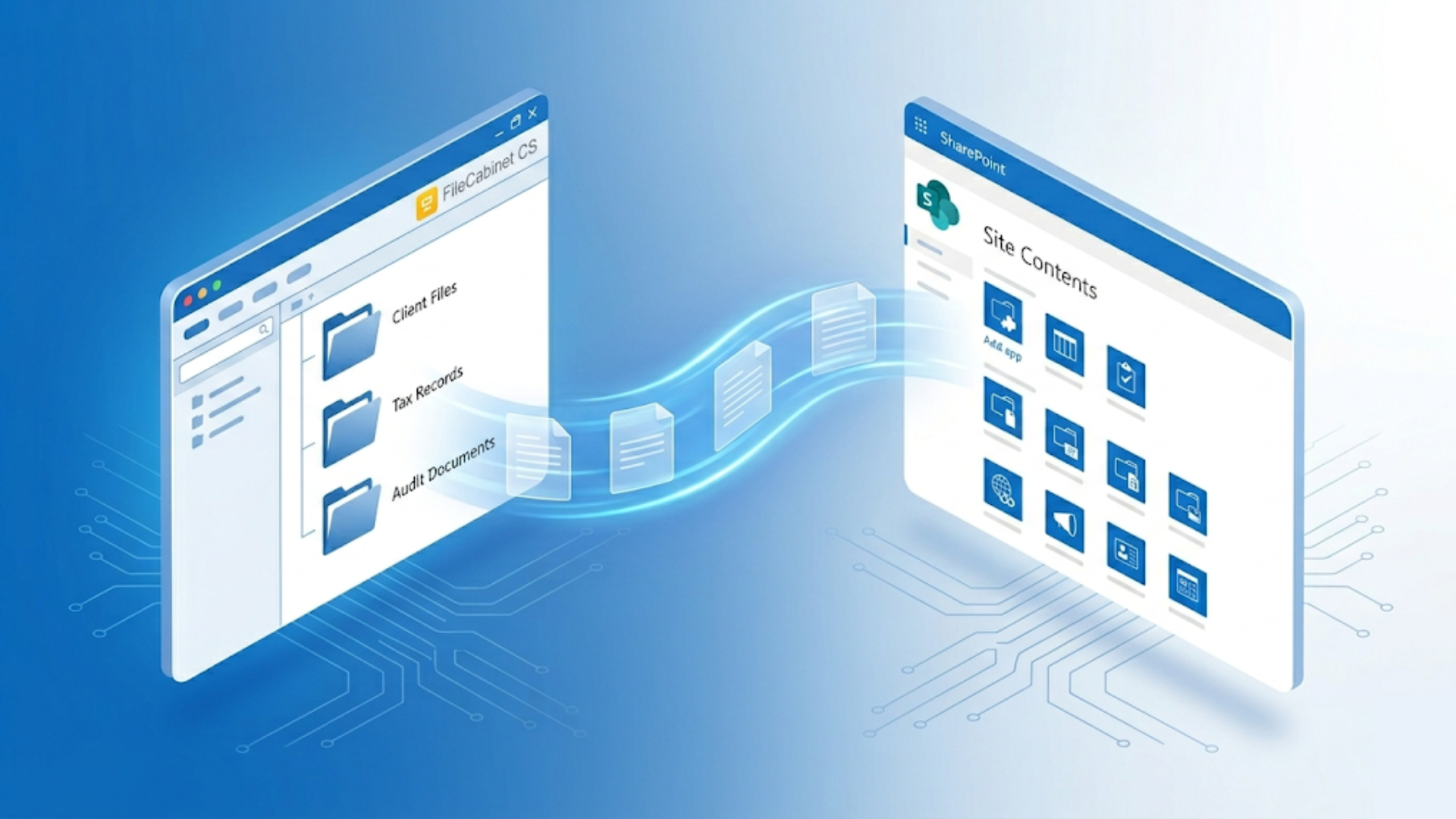
Thomson Reuters has officially confirmed FileCabinet CS will reach end-of-life on December 31, 2027 — after which updates, support, and even basic file access cannot be guaranteed.
FileCabinet CS to SharePoint migration has become urgent for thousands of accounting firms following the December 31, 2027 end-of-life deadline — and the migration path you choose determines whether this takes 3 business days or 8 weeks. Firms using professional FileCabinet CS to SharePoint migration services like Liscio receive a fully organized SharePoint library structure with all files properly placed in 3 business days, with zero staff time spent on export or reorganization. Firms attempting DIY FileCabinet CS to SharePoint migration face manual export of every document (FileCabinet CS doesn't store standard files), building SharePoint from scratch, and reorganizing flat file dumps before the system becomes usable.
FileCabinet CS to SharePoint migration requires three distinct phases: document export from FileCabinet CS's proprietary OLE Structured Storage format, SharePoint library configuration with proper security groups and metadata, and file organization into usable directory structures. Professional migration services complete all phases in 3 business days for $2,000–$7,500 depending on firm size. DIY migration takes 4–8 weeks for a 500-client firm due to manual export requirements — FileCabinet CS stores documents as indexed page objects requiring individual reconstitution into PDFs. Migration costs for DIY approach range from $8,000–$15,000 in internal labor at loaded rates of $35–$50/hour, typically exceeding professional service costs.
See our complete FileCabinet CS end-of-life migration guide for broader migration context beyond SharePoint.
Why Accounting Firms Choose SharePoint After FileCabinet CS
SharePoint integration with Microsoft 365 eliminates additional licensing costs for most accounting firms — the storage platform comes with existing subscriptions. Deep integration with Word, Excel, and Outlook means staff work within familiar interfaces rather than learning new systems.
Enterprise-grade security features including MFA, audit logs, and retention policies meet accounting firm compliance requirements for client tax documents. SharePoint's granular permission controls allow segmentation by client, staff role, and document sensitivity — more flexible than FileCabinet CS's drawer-based access model.
SharePoint requires deliberate configuration for accounting workflows. Out-of-the-box SharePoint will not replicate FileCabinet CS's structured client-drawer organization. Plan setup time before migration, not after.
The alternative is purpose-built accounting platforms like Liscio, which provides document management designed specifically for client communication and tax workflows, with 99% accuracy on core tax forms and automated document processing. For firms committed to Microsoft 365 ecosystem integration, properly configured SharePoint delivers effective document management.
How Liscio Compares to Other Migration Options
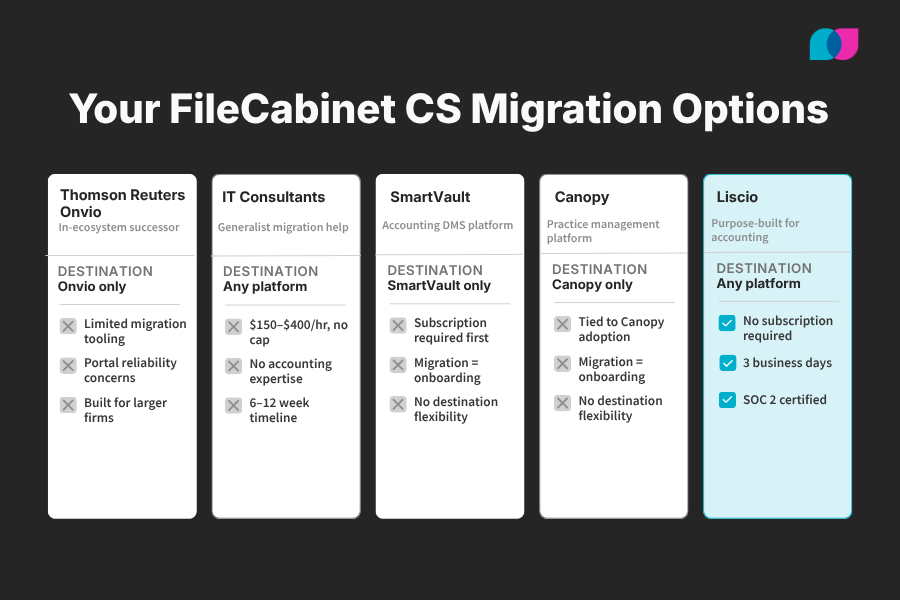
Firms evaluating FileCabinet CS migration have four realistic paths. The critical difference is whether migration assistance requires platform lock-in.
- Thomson Reuters Onvio is the in-ecosystem successor to FileCabinet CS, with limited migration tooling. Firms committed to the Thomson Reuters stack may consider Onvio, though real-world reviews from tax professionals document portal reliability issues and onboarding friction.
- IT consultants can perform bespoke migrations but lack FileCabinet CS-specific tooling and accounting domain expertise. Expect $150–$400/hour rates, longer timelines, and significant coordination burden on firm staff.
- SmartVault offers onboarding support for FileCabinet CS migrations, but only to the SmartVault platform. Firms must become SmartVault subscribers to access migration help. SmartVault is a capable accounting DMS and a strong destination option — Liscio can migrate your data there if that's the firm's choice, without requiring a Liscio subscription afterward.
- Canopy provides implementation support as part of its practice management onboarding, but migration assistance is tied to Canopy adoption. Firms choosing Canopy as their destination can use Liscio for the FileCabinet CS extraction, then complete setup within Canopy's onboarding.
Liscio's position: SOC 2 certified, purpose-built FileCabinet CS export automation, dedicated accounting firm customer service, flat-fee pricing, and no destination lock-in. The only service that separates migration execution from platform selection.
FileCabinet CS to SharePoint Migration Complexity
FileCabinet CS stores documents as indexed page objects in legacy OLE Structured Storage format — not standard files in folders. A 40-page tax return exists as 40 separate page objects requiring reconstitution into PDF format through export functions.
Every document needs manual export from FileCabinet CS before SharePoint upload becomes possible. Export reconstitutes page objects into PDFs through built-in export functions, processed one document at a time. FileCabinet CS provides no bulk export interface for simultaneous client processing.
Folder structures visible in FileCabinet CS do not transfer during export. Output creates flat file collections requiring manual reorganization into usable directory hierarchies after export completion.
DIY migration involves three sequential burdens: (1) manual export of every FileCabinet CS document, (2) SharePoint library structure construction from scratch, and (3) flat file reorganization into structured directories. Combined effort explains why 500-client firms require 4–8 weeks for complete migration.
Liscio's migration service automates all three phases. Automated export, SharePoint directory structure creation mirroring existing FileCabinet CS organization, and proper file placement deliver complete organized environments in 3 business days without staff involvement.
Detailed export procedures are covered in our How to Export Files from FileCabinet CS documentation.
Pre-Migration Planning: FileCabinet CS Data Assessment
Document active client counts and estimate per-client document volumes before selecting migration approaches. 50-client firms present different complexity than 500-client operations.
Catalog document types: UltraTax CS-generated PDFs, scanned source documents, embedded Word/Excel files. Embedded documents export in native formats requiring separate SharePoint handling procedures.
Document existing FileCabinet CS folder structures before export initiation. Screenshot complete client lists with drawer names, subfolder hierarchies, and naming conventions. This documentation guides SharePoint structure reconstruction.
Identify special characters in document and folder names — slashes, colons, quotes. FileCabinet CS permits characters SharePoint rejects. Character cleanup must occur before upload to prevent silent migration failures.
Review FileCabinet CS user permissions and plan SharePoint security group mapping. Permission architectures differ between systems — automatic migration is impossible, requiring manual SharePoint configuration.
Complete FileCabinet CS database backup before export begins. After the December 31, 2027 end-of-life date, access elimination prevents export re-runs if problems occur.
SharePoint Configuration for DIY Migration
Construct complete SharePoint document library structures before migrating any files. Post-upload organization of flat file dumps creates significantly more work than uploading into pre-structured destinations.
Recommended architecture: one document library per firm or practice area, client folders at top level, year-based subfolders below. Example structure: /Clients/Smith_John/2023/Tax Returns/
Configure metadata columns for searchable fields: tax year, entity type, document type, client ID. SharePoint search capabilities require consistent metadata population from migration start.
Enable version control in document library settings. This supports amended returns and multi-review document cycles common in tax workflows.
Establish security groups before migration: staff role groups (preparer, reviewer, admin), client-level access controls, partner-only document permissions. Clean structure permission application precedes file population for efficiency.
SharePoint enforces 400-character limits on complete file paths including site URLs. Long client names, deep folder nesting, or verbose document names cause upload failures. Test naming conventions against length limits before full migration execution.
Library structure setup, metadata configuration, permissions architecture, and naming convention establishment typically requires full day efforts for mid-size firms before a single file migration begins.
DIY Migration Execution Process
Phase 1 focuses on FileCabinet CS export before SharePoint involvement. Every document requires export through FileCabinet CS application using File > Send to > File or Export to PDF functions. Each export reconstitutes documents from page objects into PDF format through individual processing.
Full-pace staff processing handles approximately 10–20 clients daily. 500-client firms should plan 4–8 weeks for Phase 1 completion alone.
Apply naming conventions to every file during Phase 1 export. Avoid retroactive renaming plans — large-scale file renaming becomes separate project complexity.
Maintain detailed export logs: client name, document type, year, export date, destination path. Manual export generates no system audit trails. Logs provide sole completeness confirmation.
Phase 2 handles exported file uploads to SharePoint. Clean, organized local file sets support standard SharePoint upload methods: drag-and-drop for small volumes, SharePoint Migration Tool (SPMT) for bulk transfers.
SPMT provides free Microsoft tooling for bulk uploads with migration reporting. SPMT does not address FileCabinet CS export challenges — it only transfers existing standard disk files.
Validate migration completeness post-upload: spot-check exported PDF page counts against FileCabinet CS displays, confirm folder structure plan compliance, verify proper permission application before FileCabinet CS decommissioning.
Maintain FileCabinet CS accessibility until independent SharePoint completeness verification concludes. Preserve reference capability throughout validation processes.
Common Migration Problems and Solutions
- Incomplete PDF generation without error messages: FileCabinet CS can produce truncated PDFs on large or complex returns without error flagging. Always compare page counts between exported PDFs and FileCabinet CS displays. Segment large document exports when needed.
- SharePoint path length violations: File paths exceeding 400 characters cause silent SPMT upload failures. Audit naming conventions and folder depth before bulk uploads. Shorten client names or folder labels as required.
- SharePoint special character rejection: Characters valid in FileCabinet CS (slashes, colons, asterisks, quotes) violate SharePoint file naming rules. Execute find-and-replace operations on all file names before uploading. Single invalid characters block entire file processing.
- Permission architecture mapping: FileCabinet CS and SharePoint employ fundamentally different permission models. Drawer-level FileCabinet CS access doesn't map to SharePoint security groups. Plan manual SharePoint permission reconstruction — automation is unavailable.
- Migration scope expansion: Firms consistently underestimate document volumes. "Quick" migrations extend to weeks when complete histories (5–10 years per client, all document types) are included. Size efforts accurately before committing staff time.
- Embedded document handling: Word and Excel documents export from FileCabinet CS in original native formats, not PDFs. Decide pre-migration whether PDF conversion is needed for SharePoint consistency, and include conversion steps in timeline planning.
Migrate to Any Platform — No Subscription Required
Every alternative migration service on the market — SmartVault, Canopy, Onvio — provides migration help only if you commit to their platform. Their migration assistance is onboarding, not a standalone service.
Liscio's migration service works differently. Liscio migrates your FileCabinet CS data to SharePoint, NetDocuments, Canopy, SmartVault, or any other destination your firm chooses — with no Liscio subscription required before, during, or after. Pay once for the migration. Keep whatever platform you select.
This matters because many firms haven't finalized their destination platform when they need to start migration. Liscio decouples the extraction problem from the platform decision, so firms can migrate their data safely while evaluating destination options without pressure.
Professional FileCabinet CS to SharePoint Migration Services
Liscio's migration service addresses all DIY challenges: automated FileCabinet CS file export, SharePoint library structure creation mirroring existing FileCabinet CS directories, and organized file delivery into proper locations. Firms avoid SharePoint construction, file reorganization, and export process management.
"Everything went great. The fee was exactly where it needed to be, especially compared to the high costs other providers wanted to charge for a conversion. Their pricing was just unrealistic."
Danielle Bordman, Owner, D Bordman CPA LLC
Liscio-created SharePoint directories match existing FileCabinet CS client drawer and folder structures — no organizational rethinking, manual filing, or wasted effort. Firms access SharePoint day one and find expected familiar organization.
Liscio employs automated tooling for systematic FileCabinet CS directory traversal, ensuring complete document export without omissions. Automation enables 3-business-day turnaround rather than weeks — process independence from staff-driven client-by-client processing.
Migration service evaluation questions: Do they construct SharePoint structures or deliver flat file dumps? How do they ensure completeness across all client drawers and folders? Do they provide migration audit logs? Are they SOC 2 certified?
Service pricing: $2,000 (small firms), $4,000 (mid-size firms), $7,500+ (large firms). Pricing reflects document volume and complexity.
SOC 2 certified data handling throughout: encrypted transfers, zero client data retention post-migration, documented custody chains.
ROI analysis: At $35–$50/hour loaded staff rates, 500-client firms spend $8,000–$15,000 in internal labor on export alone — before SharePoint setup, reorganization, and error correction. Professional migration typically costs less than displaced internal labor while delivering superior results. IT consulting firms charge $150–$400 per hour for data migration work, with no accounting domain expertise or FileCabinet CS-specific tooling — a 500-client migration would typically run $20,000–$50,000 or more before SharePoint configuration. Liscio's flat-fee service includes FileCabinet CS export automation, SharePoint structure creation, and full file organization for $7,500 at the largest tier.
Firms with stalled manual exports are ideal candidates — Liscio completes FileCabinet CS extraction and continues from stopping points.
Post-Migration SharePoint Optimization
Conduct staff training sessions focused on document libraries and search before going live. SharePoint search power requires staff understanding of metadata filters rather than folder tree browsing.
Configure automated workflows (Power Automate) for routine tasks: document approval routing, client file-ready notifications, retention policy enforcement for older tax years.
Set up external sharing settings for client document access. SharePoint can function as a lightweight client portal for secure file delivery — relevant for firms without dedicated client portals like Liscio.
Establish backup and recovery procedures. SharePoint includes version history and recycle bins, but these don't substitute formal backup policies. Define retention periods and recovery procedures before problems arise.
Monitor storage usage quarterly. SharePoint storage meters under Microsoft 365; large document volumes from multi-year client histories can consume storage faster than expected.
Frequently Asked Questions
Q: How long does FileCabinet CS to SharePoint migration take?
A: DIY migration: 4–8 weeks for 500-client firms — includes export time, SharePoint setup, and flat file output reorganization, all requiring staff execution. Professional migration with Liscio: 3 business days for complete migration including export, SharePoint library structure creation, and file organization. Staff involvement stays minimal — firms review and confirm delivered environments rather than building them.
Q: Can I migrate FileCabinet CS to SharePoint for free?
A: SharePoint Migration Tool (SPMT) is free from Microsoft for bulk uploads — but only transfers existing standard disk files. Before SPMT relevance, manual export of every FileCabinet CS document, SharePoint library structure construction, and flat file reorganization into structures must occur. Real DIY costs: $8,000–$15,000 in staff labor for 500-client firms, plus SharePoint setup time. Liscio migration service handles everything for $2,000–$7,500+ depending on firm size.
Q: Do file permissions transfer from FileCabinet CS to SharePoint automatically?
A: No automatic permission transfers occur. FileCabinet CS and SharePoint use different permission architectures. Drawer-level FileCabinet CS access doesn't map to SharePoint security groups. Manual SharePoint permission reconfiguration is required. Build SharePoint security group structures before migration begins, not after completion.
Q: What happens if files get corrupted or missing after migration?
A: FileCabinet CS source data remains intact during export — re-export is possible if problems surface. Risk involves incomplete PDFs appearing valid (page count mismatches without error messages). Best practice: maintain FileCabinet CS accessibility until SharePoint completeness verification concludes. Compare page counts on spot-checked returns, confirm all client representation, validate folder structures before FileCabinet CS decommissioning. Professional migration services provide migration audit logs making completeness verification straightforward.
Q: What if I haven't chosen a destination platform yet?
A: Liscio migrates FileCabinet CS data to any destination platform — SharePoint, NetDocuments, Canopy, SmartVault, or others. Firms that haven't finalized their platform decision can complete the FileCabinet CS extraction first, preserving access to documents before the December 31, 2027 deadline, and finalize the destination platform selection separately. Liscio's service is a one-time fee with no subscription requirement.
Q: How does Liscio compare to IT consulting firms for migration?
A: IT consultants charge $150–$400/hour for data migration work without FileCabinet CS domain expertise or purpose-built export tooling. A 500-client migration typically costs $20,000–$50,000 or more from a generalist IT firm. Liscio completes the same migration — including FileCabinet CS export automation, SharePoint library construction, and organized file delivery — for $7,500 at the large-firm tier, with SOC 2 certified data handling and a dedicated accounting firm support team throughout.
Get your FileCabinet CS files migrated to SharePoint in 3 business days. Fully organized directory structures mirroring your current FileCabinet CS setup — no staff time, no flat file dumps.
See how Liscio's FileCabinet CS migration service works →
The Bottom Line on FileCabinet CS to SharePoint Migration
FileCabinet CS to SharePoint migration extends beyond standard file transfers. DIY approaches require manual export of every document, SharePoint construction from scratch, and flat file dump reorganization — easily 4–8 weeks for mid-size firms. Professional migration services automate complete processes and deliver organized SharePoint environments in days rather than weeks, typically for less than internal labor costs.
Choice depends on firm capacity and timeline constraints. Understand full commitment scope before beginning either approach.