
Automated tax document classification requires highly specialized logic to maintain the integrity of accounting workflows. Unlike general-purpose document processing, tax compliance hinges on the precise identification of structured IRS forms, multi-page sequential documents, and relational field data. When classification systems fail to account for these specific technical requirements, the resulting error rates create significant operational bottlenecks that undermine the efficiency gains promised by automation.
These failures typically stem from a fundamental architectural mismatch: most AI solutions treat tax documents like generic business paperwork. A 1099-NEC isn’t a standard contract, and a Schedule K-1 is not a simple invoice. Because these documents possess unique structural dependencies and year-over-year layout variations, generic AI models often lack the necessary classification logic to process them reliably. This gap between general-purpose training and tax-specific reality costs firms thousands of hours in manual remediation during peak filing seasons.
AI tax document classification fails in accounting firms because generic systems achieve only 70–80% accuracy on tax forms, while purpose-built solutions achieve 99% accuracy on core forms through tax-specific training data and form-aware processing logic. The cost difference compounds during busy season when error correction requires 2–5 minutes per misclassified document.
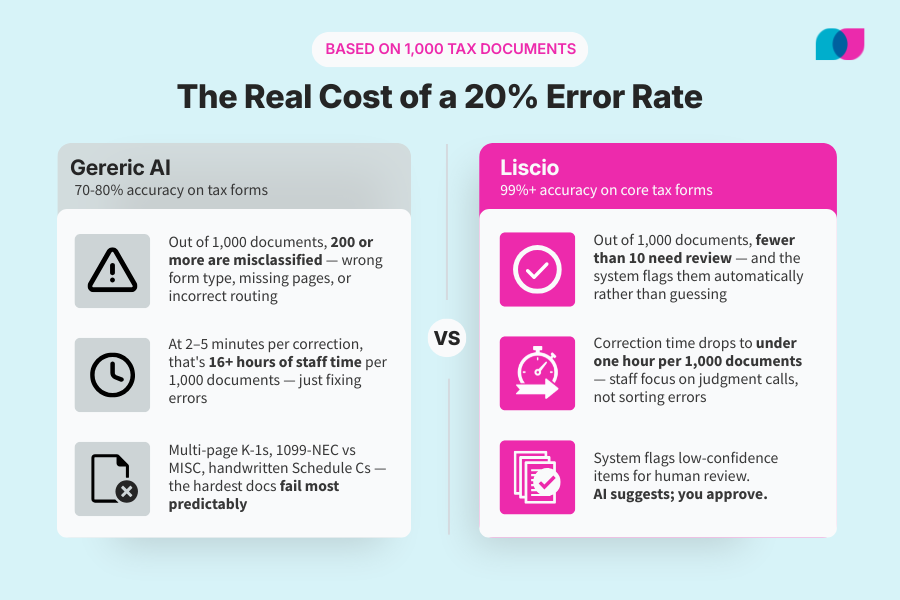
Generic AI isn’t built for the complexity of IRS forms. The difference between 80% and 99% accuracy is 15+ hours of recovered staff time per 1,000 documents.
The Core Problems with Generic AI Tax Document Classification
Generic AI document classification systems fail accounting firms because they’re built for the wrong problem. These models train on millions of general business documents — contracts, invoices, correspondence — then attempt to classify tax forms as an afterthought. The mismatch shows up immediately in practice.
Multi-page documents break first. Schedule K-1s from partnerships can span 20+ pages with varying layouts depending on the entity structure. Generic AI models analyze pages individually, missing the sequential logic that identifies the complete document. Your system might correctly identify page one as a K-1, then classify pages two through fifteen as “miscellaneous tax documents” or miss them entirely.
Similar form types create consistent confusion. The visual difference between a 1099-MISC and 1099-NEC is subtle — nearly identical layouts with minor field variations. Generic models struggle with these distinctions because they rely on overall document structure rather than specific field content. This isn’t an edge case during tax season; these are core documents that determine reporting requirements and client compliance.
Cost per API call makes volume processing prohibitive. Standard AI services charge per document processed through their language models. During peak filing season, when firms handle thousands of documents weekly, these costs compound rapidly. More expensive still: the hidden cost of error correction. When your AI system misclassifies 30% of documents, staff time spent fixing those errors often exceeds the original sorting task.
Tax year variations compound the accuracy problem. The IRS modifies form layouts regularly. The 2024 Schedule C looks different from 2023, with field relocations and new reporting requirements. Generic AI models don’t understand these year-to-year variations because they’re not trained on tax-specific data sets that track IRS format changes over time.
The result? You get a system that works adequately on standard business documents but fails precisely where accounting firms need reliability most: accurately identifying and processing the forms that determine client compliance and firm liability.
Why Tax Documents Break Standard OCR and Document Classification AI Models
Tax documents present technical challenges that general-purpose AI simply wasn’t designed to solve. Understanding why these systems fail helps explain why specialized approaches work better.
Tax forms use structured field relationships that generic AI ignores. A W-2 isn’t just a document with numbers — it’s a specific data structure where Box 1 (wages) should logically relate to Box 2 (federal withholding) and Box 12 (deferred compensation codes). Generic AI models see individual fields but miss these relational validations. They might correctly extract numbers but fail to flag obvious errors like federal withholding exceeding gross wages.
Multi-column layouts and embedded tables confuse standard OCR processing. Schedule K-1s from large partnerships often contain complex table structures with data flowing across columns and nested subcategories. Standard OCR reads left-to-right, top-to-bottom, missing the columnar logic that tax preparers need. The system might extract all the numbers but deliver them in the wrong sequence, making the data unusable.
Mixed handwritten and printed text requires specialized preprocessing. Client-completed forms combine printed IRS layouts with handwritten entries. Generic AI models handle one or the other well, but struggle when both appear on the same document. A partially completed Schedule C with handwritten income figures and printed expense categories needs preprocessing that understands which fields expect handwritten input and which should remain printed.
Quality variations demand tax-specific error handling. Clients submit documents as high-resolution scans, smartphone photos, fax copies, and email attachments in varying quality. Each format requires different preprocessing approaches. A faxed W-2 needs different contrast enhancement than a photographed 1099-INT. Generic systems apply uniform processing that works for average quality but fails on the problem documents that create the most staff time.
This technical complexity explains why firms experience such inconsistent results with general AI tools. The documents that cause the most operational pain — multi-page K-1s, handwritten Schedule Cs, low-quality scanned 1099s — are precisely the ones where generic approaches fail most predictably.
The Hidden Costs of AI Classification Errors in Tax Document Processing
Classification errors create cascading operational costs that extend far beyond the initial misidentification. These costs compound during busy season when correction time is most expensive and client patience runs thin.
| Error Type | Time to Correct | Cost Impact |
|---|---|---|
| Misclassified W-2 | 2–3 minutes | Staff rework + client confusion |
| Missing K-1 pages | 5–10 minutes | Compliance risk + return delays |
| Wrong 1099 type | 3–5 minutes | Import errors + data re-entry |
| Lost amended returns | 10+ minutes | Deadline pressure + client calls |
Staff time spent on rework often exceeds original task time. When AI misclassifies a document, someone must first identify the error, locate the original file, determine the correct classification, and re-route it through your workflow. This process typically takes longer than manual classification would have required initially, because staff must also investigate why the error occurred and whether similar documents need review.
Client frustration accelerates when requests feel repetitive. Nothing damages client relationships faster than asking for documents they already provided. When your system misclassifies or loses track of submitted forms, follow-up requests appear negligent rather than thorough. Clients question your attention to their work and your technology competence — both critical trust factors for accounting relationships.
Compliance risks multiply with missing or misclassified supporting documents. A misclassified Schedule K-1 might not appear in your tax preparation software’s import routine, leading to missing income reporting. The immediate cost is return amendment time. The long-term cost is malpractice exposure and client trust damage when the IRS identifies missing income that you should have caught.
Partner time gets pulled into routine administrative tasks. When documents are lost or miscategorized in back-office processes, partners begin reviewing and correcting routine sorting decisions. This represents the highest-cost staff time applied to the lowest-value activity — exactly the inefficiency that drives talented professionals out of tax practice.
These hidden costs typically exceed the visible technology expenses by multiples.
What Actually Works: Purpose-Built Tax Document Classification AI
Purpose-built tax document classification takes a fundamentally different approach: identify document types before expensive AI processing, then apply specialized logic for each form category. This deterministic method achieves the highest level of accuracy on core tax forms (1040, W-2, 1099 series, K-1) while processing the supermajority of documents without costly LLM calls.
Rather than analyzing entire document content through expensive language models, purpose-built systems identify form types through structural markers — IRS form numbers, specific field positions, page layouts. A W-2 has predictable characteristics that distinguish it from other documents immediately. This pre-classification step routes each document to specialized processing logic designed for that specific form type.
Tax-year-aware processing handles IRS format changes automatically. Purpose-built systems maintain training data sets that track form layout changes across tax years. When the IRS relocates fields on Schedule C between 2023 and 2024, the system recognizes both versions rather than treating the updated format as an unknown document type. This institutional knowledge prevents accuracy degradation when clients submit forms from different tax years.
Built-in field validation catches what generic systems miss. Beyond simple text extraction, purpose-built systems understand tax document logic. They know that Box 1 and Box 2 on a W-2 should follow specific mathematical relationships, that 1099-NEC amounts need different handling than 1099-MISC reporting, that Schedule K-1 items flow to specific tax return lines. This contextual processing catches errors that generic AI misses and structures data in formats that tax software expects.
The operational difference is immediate: documents flow through classification automatically without staff intervention, errors drop to statistically insignificant levels, and processing costs become predictable rather than variable based on volume.
How to Evaluate Tax Document Classification Systems for Accounting Firms
Test document classification accuracy on your actual client documents. Start with both your most common and problematic documents from the previous tax season. Measure processing speed during simulated peak volume. Upload 100+ documents simultaneously to test system response under load. Many AI services slow dramatically when processing queues fill up, creating bottlenecks precisely when you need fastest throughput. Document processing that takes 30 seconds per file during vendor demos might require 5+ minutes per file when your entire client base uploads forms simultaneously in February.
Calculate true cost including error correction time. Request detailed error reporting that shows misclassification rates by document type. Multiply correction time by your staff billing rates to determine true system cost. A “low-cost” solution that misclassifies 25% of documents often costs more in staff time than premium solutions with 99% accuracy rates.
The evaluation process should feel like busy season stress-testing, not a calm technology demonstration. Systems that perform well under operational pressure deliver the reliability you need when accuracy matters most.
Implementation Strategy for Accounting Firms Adopting AI Tax Document Classification
Successful implementation requires parallel testing and staged rollouts that minimize busy season disruption while maximizing accuracy improvements. Most firms fail by attempting complete system replacement during peak periods when staff have no time for learning curves.
Audit current document classification accuracy and costs before switching. Track how much time staff currently spend sorting, correcting, and re-processing documents. Measure misclassification rates by document type and calculate the hourly cost of manual corrections. This baseline helps you measure improvement and justify technology investment to partners who question changing working systems.
Run parallel testing during May through December when volume is manageable. Process incoming documents through both your current system and the new solution simultaneously. Compare accuracy rates, processing speeds, and staff time requirements without risking busy season disruption. Parallel testing reveals system differences under real conditions while maintaining operational continuity.
Train staff on new workflows early. Staff need time to develop muscle memory with new systems before peak season stress begins. Schedule training sessions during slow periods when people can focus on learning rather than urgently processing client work. Include scenarios for handling edge cases and error correction procedures.
Establish client communication about improved document processing capabilities. Inform clients about document processing capabilities as part of your service improvement messaging. This sets expectations for faster turnaround times while creating opportunity to address submission quality issues that help any system perform better.
Plan rollout timeline around tax deadlines rather than calendar years. Technology changes should stabilize well before busy season begins. Implement new document classification systems by November, allowing two months of operational experience before peak volume arrives. Mid-season technology changes create unnecessary stress when staff attention should focus on client work.
Frequently Asked Questions
Q: How accurate is AI for tax document classification?
A: Accuracy depends entirely on system design. Generic AI document classification typically achieves 70–80% accuracy on tax forms, requiring significant manual correction. Purpose-built solutions designed specifically for tax documents achieve 99%+ accuracy on core forms (1040, W-2, 1099 series, K-1) and 95%+ accuracy on unstructured documents. The difference comes from tax-specific training data and form-aware processing logic rather than general document analysis.
Q: What tax documents can AI classify automatically?
A: High-accuracy automatic classification works best for standardized IRS forms: W-2s, all 1099 variants, 1098s, 1040s, and Schedule K-1s. These forms have consistent structures that systems can reliably identify. Supporting documents like receipts, bank statements, and correspondence require more sophisticated processing and may need human verification. Complex multi-page documents (consolidated K-1s, extensive business schedules) benefit from hybrid approaches that combine AI classification with human review.
Q: How much does AI tax document classification cost?
A: Pricing varies dramatically between generic AI services and purpose-built solutions. Generic services typically charge per API call, ranging from $0.08 to $0.10 per document processed. During busy season, these costs multiply quickly. Purpose-built solutions often use flat-rate pricing at a fraction of the cost. Factor in error correction costs: manual rework typically requires 2–5 minutes per misclassified document, making accuracy more important than base pricing.
Q: Can AI handle handwritten tax documents?
A: AI handles handwritten text inconsistently, especially when mixed with printed forms. Modern OCR technology works well on clearly handwritten block letters but struggles with cursive writing, rushed handwriting, or forms completed with poor-quality pens. Purpose-built tax solutions include preprocessing specifically designed for common handwritten scenarios — Schedule C expense entries, Form 8879 signatures, client-completed organizers. For critical handwritten documents, hybrid workflows that flag items for human review provide better reliability than fully automated processing. Liscio suggests. You decide. Always.
See how Liscio handles your actual tax documents.
Purpose-built classification, 99%+ accuracy on core forms, and zero guessing.