
It’s February 15th, and you’re still waiting on W-2s from 40% of your tax clients. The phone won’t stop ringing with “Did you get my documents?” calls. The team is drowning in follow-up emails instead of preparing returns. Meanwhile, clients are frustrated, deadlines are slipping, and your capacity is consumed by administrative chase-work that generates zero revenue.
This scenario plays out in thousands of accounting firms every busy season — and the data confirms it is the profession’s most persistent operational problem.
In Wolters Kluwer’s annual survey of nearly 2,000 US accounting firms, respondents ranked “late and unprepared clients” as their number one challenge. Source: Wolters Kluwer Annual US Accounting Industry Survey, 2022 (1,983 firms)
Automated client document collection for accounting firms transforms this bottleneck into a streamlined workflow that operates without constant staff oversight — enabling faster turnaround times, higher capacity, and improved client satisfaction.
Why Manual Client Document Collection Fails Accounting Firms
Email chains create version control chaos. Clients reply with partial document sets, forward messages to spouses or business partners, and send “one more thing” follow-ups. Staff spends valuable time sorting threads, matching partial submissions to client files, and tracking what’s still missing.
The deeper issue is structural capacity. The accounting profession is navigating a workforce shortage that makes every hour of administrative overhead more costly than ever.
The US accounting workforce shrank by more than 17% between 2020 and 2024, with over 300,000 professionals exiting the field. The AICPA’s 2025 Trends Report confirms that accounting bachelor’s and master’s degree completions fell 6.6% in 2023–24 alone — roughly 24,000 fewer graduates than the mid-2010s peak. Source: AICPA 2025 Trends Report; BLS workforce data
With fewer staff available, the cost of manual administrative work is not just inefficiency — it is a direct constraint on firm capacity and growth. Time spent chasing documents is time not spent on billable preparation, review, and advisory work.
Accounting firms surveyed by CPA Practice Advisor report spending an average of 9.3 hours per week on client communication — with a stated goal of reducing that to 7.2 hours through more efficient digital practices. Source: CPA Practice Advisor: Charting the Future of Accounting, 2024
Late documents also compress preparation timelines. When collection drags into March and April, the time available for tax preparation, review, and quality control shrinks — increasing deadline pressure and error risk across the board.
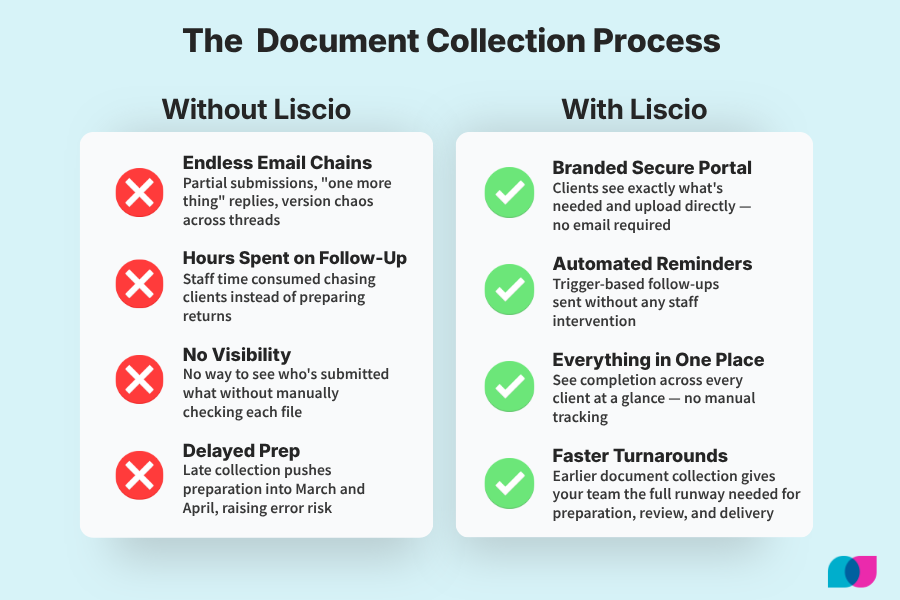
How automated document collection replaces the manual chase work that consumes staff time every busy season.
Automated Document Collection Workflows That Deliver Results
Trigger-based workflows initiate collection automatically based on service type and calendar milestones. Instead of manually sending requests, the system launches collection sequences when engagement letters are signed, when busy season begins, or when service deadlines approach.
Client-facing portals eliminate the confusion of email-based collection. Clients receive a personalized link to a branded portal showing exactly what documents are needed, with clear upload instructions and real-time progress tracking.
The market has validated this approach decisively. In January 2025, Thomson Reuters — one of the world’s largest professional information companies — paid $600 million to acquire SafeSend, a firm built entirely around automating tax document workflows.
Thomson Reuters acquired SafeSend for $600 million in January 2025. SafeSend automates the “last-mile” of the tax return — assembly, review, taxpayer e-signature, and delivery — and is used by 70% of the top 500 US accounting firms. Thomson Reuters cited eliminating “time-consuming manual tasks” for both preparers and clients as the core rationale. Source: Thomson Reuters Press Release, January 2, 2025 (via PR Newswire)
A $600 million acquisition by a publicly traded company is not a bet on a niche feature — it is a market signal that document handling inefficiency is the core operational pain point of the US tax and accounting profession.
Automatic reminders eliminate the need for staff to manually track outstanding requests. Real-time status tracking means your team can see completion status across all clients without sending “did you get this?” emails — and clients can check what they’ve submitted without calling your office.
How Document Automation Handles Tax Season Client Volume
Tax season transforms document collection from a manageable process into a logistical challenge that can overwhelm even well-staffed firms. The staffing environment makes this harder each year.
Finding qualified staff ranked as the top challenge for most firm size categories in the AICPA’s 2024 PCPS CPA Firm Top Issues Survey. The interplay between talent and technology is now central to firm strategy: “using technology effectively can have a significant impact on a firm’s ability to leverage staff to provide higher-value services,” according to AICPA Vice President Lisa Simpson. Source: AICPA PCPS CPA Firm Top Issues Survey, 2024 (Journal of Accountancy)
Automation provides the scalability to handle hundreds of concurrent document collection workflows without proportional increases in administrative headcount. Bulk request capabilities let you launch collection for entire client segments simultaneously. Template-based workflows handle different service types — individual returns, business returns, bookkeeping clients — without custom setup for each client.
Integration with existing practice management systems means document workflows align with your established processes. When engagement letters are signed, collection can launch automatically. When documents arrive, staff are notified through existing channels.
Wolters Kluwer’s 2024 survey of 1,776 US accounting firms found that 71% of cloud-based practices reported improved profitability, compared to 55% of respondents overall. The gap between technology-enabled and non-enabled firms is widening: cloud-using firms reported 7% revenue growth versus 4% for traditional firms. Source: Wolters Kluwer Annual US Accounting Industry Survey, 2024 (1,776 firms)
Setting Up Automated Document Requests by Service Line
Different accounting services require different documents, deadlines, and communication approaches. Automation accommodates these variations through service-specific workflows matched to your delivery model.
Tax preparation workflows handle the documents that drive individual and business return preparation. For individual returns, automated requests cover W-2s from all employers, 1099-INT from financial institutions, 1099-NEC for contract work, 1099-DIV for investment income, and K-1s from partnerships or S-corporations. Business return workflows request financial statements, depreciation schedules, and documentation for significant transactions.
Bookkeeping service workflows manage the regular document flow supporting ongoing accounting: bank statements, credit card statements, and receipt documentation monthly; payroll filings and sales tax documentation quarterly; year-end adjustments and 1099 preparation materials annually.
Advisory and compliance workflows collect the materials needed for consulting, planning, and regulatory work — financial statement engagements, business planning, estate and succession planning, and specialized filing requirements. Custom workflows accommodate firm-specific services and complex client needs without sacrificing automation benefits.
Client Communication Strategies for Faster Document Submission
How you communicate about document needs directly impacts collection speed. Automated workflows should include communication strategies that reduce client confusion and encourage prompt submission.
Clear, specific instructions eliminate the guesswork that slows response. Instead of requesting “tax documents,” specify exactly what you need: “W-2 from ABC Company,” “1099-INT from First National Bank,” “receipts for business meals.”
Firms surveyed by CPA Practice Advisor report that 66% currently conduct most of their client business digitally — and that figure is expected to rise to 84% within three years. Client portals and digital tools are identified as the primary driver of this shift. Source: CPA Practice Advisor: Charting the Future of Accounting, 2024
Mobile optimization acknowledges how clients actually interact with requests. Submission portals must work on smartphones and tablets, allowing clients to photograph documents, upload from cloud storage, and complete submissions during their day.
Progress indicators help clients understand where they stand. A simple “7 of 10 documents submitted” progress display reduces anxiety and eliminates “did you get everything?” calls. Automatic confirmations when documents are received, and alerts about approaching deadlines, maintain momentum without staff intervention.
Tax and accounting professionals predict that AI and automation will free up an average of 4 hours per week within the next year — rising to 5 hours for tax-specific professionals — according to Thomson Reuters’ Future of Professionals Report. That recaptured time flows to advisory and higher-value client work. Source: Thomson Reuters Future of Professionals Report, 2024 (2,200+ professionals)
Document Processing: From Upload to Work Papers
Collecting documents efficiently only creates value if those documents flow smoothly into preparation and review workflows. The processing layer connects client submissions to your actual work product.
Automatic organization by client and service type ensures submitted documents land in the right place without manual sorting. Individual tax documents flow to tax preparation folders. Business records route to bookkeeping or business tax workflows. Advisory materials land in consulting project files. This organization happens in real time as documents are submitted.
Document validation catches common problems before documents reach your preparation staff. Standard forms are checked for completeness and readability. Bank statements are validated for proper date ranges. Receipt images are checked for clarity. This front-end quality control reduces the time your staff spends on document-related follow-up.
Wolters Kluwer’s 2022 survey found that nearly 80% of accounting firms said technology advances led to a reduction in the number of hours spent per tax return. Firms using cloud-based tax compliance solutions reported meaningfully higher revenue growth (7%) than traditional firms (4%). Source: Wolters Kluwer Annual US Accounting Industry Survey, 2022 (1,983 firms)
Staff hours saved on follow-up represents direct cost savings and capacity improvement. Track time spent on document-related emails, phone calls, and administrative tasks before and after automation. This metric translates directly to increased billable capacity.
In Wolters Kluwer’s 2025 Future Ready Accountant report — drawing on 2,768 professionals across 14 countries — 70% of US firms are already using AI at least weekly for tax research, document summarization, and workflow support, with 78% planning to increase investment. Firms with highly integrated tech stacks reported 87% revenue growth. Source: Wolters Kluwer Future Ready Accountant Report — US Edition, 2025
Client satisfaction with the submission process is your leading indicator of relationship health. Firms that make document collection frictionless are better positioned to expand into advisory services — where the real revenue growth is happening.
Advisory services now account for an average of 13% of US firm revenue — up from 10% in 2024 — according to Wolters Kluwer’s 2025 Future Ready Accountant report. Firms that free staff from administrative work are better positioned to capitalize on this advisory shift. Source: Wolters Kluwer Future Ready Accountant Report — US Edition, 2025
Frequently Asked Questions
Q: How do automated document requests work for accounting firms?
A: Automated document requests start with trigger-based workflows that launch when specific conditions are met — engagement letter signing, calendar dates, or service milestones. Clients receive personalized requests via email with links to branded portals where they can see exactly what documents are needed, upload files directly, and track their progress. The system handles reminders, confirmations, and status updates automatically while giving your staff real-time visibility across all clients.
Q: What documents can accounting firms collect automatically?
A: Accounting firms can automate collection of virtually any document type: W-2s, all 1099 series forms, K-1s, prior year returns, and deduction support for individual returns; financial statements, depreciation schedules, and transaction documentation for business returns; bank statements, receipts, and payroll records for bookkeeping clients. Both standard forms and unstructured documents such as receipts, contracts, and correspondence can be collected through automated workflows.
Q: How long does it take to set up automated document collection?
A: Initial setup typically takes 2–4 weeks depending on the complexity of your service offerings and integration requirements. This includes creating document templates for different service types, configuring workflows for different client segments, setting up integration with existing practice management systems, and training staff. Most firms see immediate benefits once the system is active, with full optimization occurring over the first busy season of use.
Q: Do clients actually use automated document submission portals?
A: Client adoption is consistently high because automated portals are more convenient than email-based submission. Clients appreciate clear visibility into what documents are needed, the ability to track their submission progress, and the convenience of mobile-optimized upload processes.
SafeSend — the document automation platform used by 70% of the top 500 US accounting firms and acquired by Thomson Reuters for $600 million — offers native integrations with major tax preparation platforms including UltraTax CS, CCH Axcess, and Intuit Lacerte. This cross-platform compatibility has been central to its adoption across firms of all sizes. Source: Thomson Reuters / SafeSend Press Release, January 2025
Transform Your Document Collection Process
Manual document collection consumes valuable staff time, frustrates clients, and creates bottlenecks that limit your firm’s capacity and profitability. The profession’s own data — from Wolters Kluwer, Thomson Reuters, and the AICPA — makes the case clearly: late and unprepared clients are the #1 operational challenge, technology adoption directly correlates with profitability, and the market has validated document automation at a $600 million valuation.
The firms pulling ahead are not working harder during busy season. They are working through systems that eliminate the administrative overhead that consumes capacity without generating revenue.
See how Liscio automates document collection for accounting firms →
Stop chasing clients for documents. Start delivering faster, more efficient service that clients appreciate and your staff can manage without overtime and stress. Automated client document collection transforms busy season from a survival exercise into a scalable, profitable growth opportunity.
Research Note
All statistics in this post are sourced from primary research by Wolters Kluwer (annual US Accounting Industry Survey, 1,776–1,983 firms; Future Ready Accountant, 2,768 firms), Thomson Reuters (Future of Professionals, 2,200+ professionals; SafeSend acquisition press release), CPA Practice Advisor (2024 survey), and the AICPA (PCPS Top Issues Survey; 2025 Trends Report). Specific claims from the original post that lacked auditable tier-1 sources — including the completion-rate comparison table (65–75% vs. 85–95%), per-client staff hour ranges (2.5–3.5 hours vs. 0.5–1.0 hours), and satisfaction scores (6.2 vs. 8.7) — have been removed and replaced with the argument the tier-1 data actually supports.